The room looks perfect. The camera does not. A slow dark band crawls across a presenter's face on the stream, and everybody in the building starts blaming the fixtures. Most of the time the fixtures are behaving exactly as designed — two clocks are simply not in step: the PWM period inside the driver, and the exposure window inside the camera. This is how to tell which clock is wrong, what the frequency number on a spec sheet actually buys, and the three questions that settle it before you buy.
1. The Rehearsal Looks Fine, the Stream Does Not
A 400-seat theatre reopens with a new LED rig. Focus is clean, colour is even, the room looks better than it did with the old discharge fixtures. Then the first livestream goes out, and in the replay there is a soft dark band drifting slowly up a presenter's face.
Nobody did anything wrong. The lighting designer set levels that looked right. The video operator used the camera the venue already owned. The fixtures are the ones on the invoice. And yet the picture has an artifact that was not there during rehearsal — because during rehearsal nobody was looking at a monitor.
What happens next usually costs more than it should. Three prescriptions get tried in this order:
- Replace the fixtures. The most expensive answer, and the one most often arrived at first.
- Replace the camera. More expensive still, and it does not fix a fixture-side problem.
- Run everything at full. Works, sometimes, and throws away every cue that involved a dim level.
All three assume the fault is in one device. It usually is not. A rolling band is an interaction, and an interaction has two ends. Before anything gets replaced, it is worth ten minutes of diagnosis — because the fix is often a menu setting on the fixture, a shutter setting on the camera, or a number that should have been on the spec sheet and was not.
2. Two Kinds of Flicker That Get Confused
The word "flicker" covers two unrelated problems with opposite solutions, and most of the confusion in this field comes from treating them as one.
Mains-related flicker. Light that pulses in step with the AC supply. In a 50 Hz country the supply reverses 100 times a second, and any light source whose output follows that ripple — an incandescent filament with thermal mass, a discharge lamp on a magnetic ballast, some cheap LED drivers with inadequate smoothing — pulses at 100 Hz. Cameras deal with this through shutter speed: 1/50 s or 1/100 s in a 50 Hz country, 1/60 s or 1/120 s in a 60 Hz country. This is what the "flicker reduction" presets on consumer cameras are actually for.
PWM flicker. Light that pulses because the fixture's own driver is switching the LED on and off to dim it. The frequency is set by electronics, not by the grid, and it can be anything from a few hundred hertz to tens of kilohertz. Shutter presets do not fix it. Drag your shutter to 1/50 s and a 600 Hz fixture will still band, because 600 Hz has nothing to do with 50 Hz.
| Mains-related flicker | PWM flicker | |
|---|---|---|
| Source | AC supply ripple, ballast design, poor smoothing | LED driver switching frequency |
| Typical rate | 100 Hz (50 Hz supply) or 120 Hz (60 Hz supply) | 500 Hz to 25 kHz, occasionally higher |
| What it looks like | Whole frame brightens and darkens, or a broad band | Fine horizontal stripes, worse at low dim levels |
| Affected by shutter speed | Yes — this is the fix | Barely — the fixture's rate is unrelated |
| Fix | Lock shutter to 1/50 or 1/100 | Change the fixture's PWM rate, or the fixture |
The distinction matters because it decides who gets the phone call. If the problem tracks shutter speed, it is the camera or the power. If it does not move when you change shutter, the fixture's switching rate is in the picture, and no camera setting will take it out.
3. What PWM Actually Does
An LED cannot be dimmed by lowering its voltage the way a filament can. Below its forward voltage it simply stops conducting, and driving it in the half-on region shifts its colour and shortens its life. So the driver dims it by switching: full current, on and off, many times a second.
At 100% the switch stays closed. At 50% it is closed half the time. At 5% it is closed for a twentieth of each cycle. The eye integrates this — at anything above roughly 100 Hz it reads the average, not the pulses, which is why a fixture can be visibly steady in the room while being a strobe to a sensor.
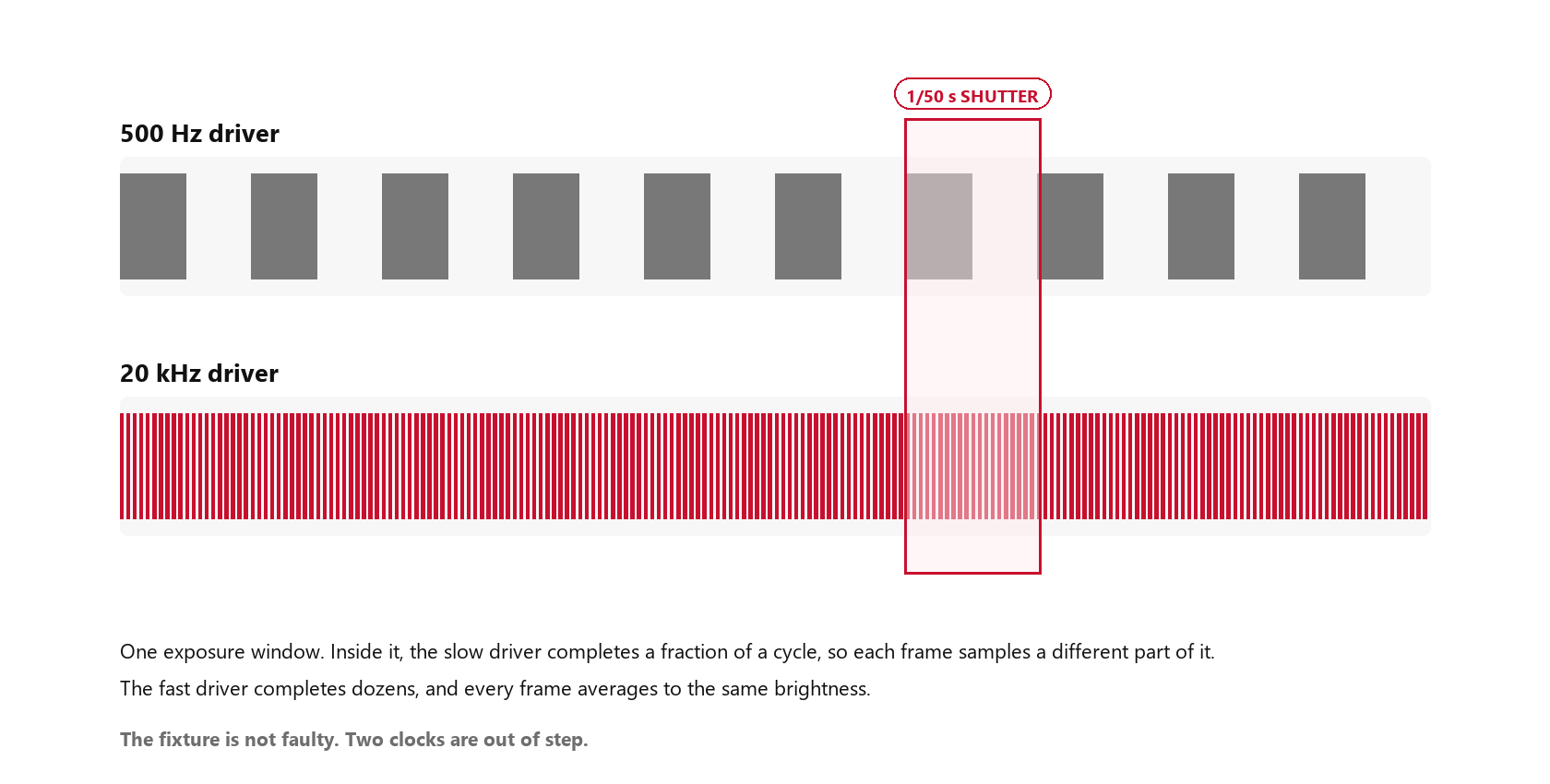
A camera does not integrate the way an eye does. It exposes for a fixed window, then reads out. That window is set by frame rate and shutter: at 25 fps with a 180° shutter, each frame is exposed for 1/50 s, or 20 ms.
Now put a PWM rate inside that window. At 500 Hz the period is 2 ms, so a 20 ms exposure contains exactly twenty cycles — every frame sees the same twenty, and the picture is stable. At 480 Hz the period is 2.083 ms, so the same window holds 19.2 cycles. One frame catches a little more of the on-time than the next, the error accumulates, and the sampling drifts in and out of phase with the switching. What a viewer sees is not a 480 Hz strobe but a slow, low-frequency pulse — a beat.
That beat follows from the mismatch:
Beat frequency = (cycles per frame − nearest whole number) × frame rate
At 25 fps, 480 Hz gives 19.2 cycles per frame, so the beat is 0.2 × 25 = 5 Hz — a band drifting up the frame about five times a second. At 25 fps, 500 Hz gives exactly 20 and produces nothing at all. Push the rate up and the mismatch shrinks: 1,010 Hz at 25 fps is 40.4 cycles per frame, a beat of 0.4 × 25 = 10 Hz, which is faster and more visible than the 5 Hz case, not less.
The same arithmetic explains why an artifact can appear the day a venue changes how it records. A 780 Hz fixture at 30 fps gives 26 cycles per frame and is clean. At 25 fps the same fixture gives 31.2, a beat of 5 Hz. At 50 fps it gives 15.6, a beat of 20 Hz. Nothing about the fixture changed — only the recording did. That is the single most useful diagnostic in this article: if the artifact changes when you change frame rate, the fixture's rate is in the picture.
None of this requires the PWM rate to be "wrong". A 500 Hz fixture is perfectly legal and perfectly fine on a stage with no cameras. It becomes wrong the moment a camera is pointed at it, and no amount of colour correction in post will take the beat out.
4. Why It Becomes Horizontal Bands
A frame is not captured all at once. Most cameras below the broadcast tier use a rolling shutter: the sensor is read out line by line, from top to bottom, over a period that can be a substantial fraction of the frame.
That means the top of the image and the bottom of the image are exposed at different moments. If the light is steady, this does not matter — every line integrates the same brightness. If the light is switching, each line integrates a slightly different slice of the PWM cycle, and the result is a gradient of brightness down the frame. Do it across a full frame and the gradient becomes visible stripes: bright where the sampling landed on on-time, dark where it landed on off-time.
Two consequences follow, and both are useful in diagnosis:
- The bands run horizontally because the readout runs vertically. Vertical bands would mean a different mechanism entirely — usually a video wall or an LED screen, not a fixture.
- The bands move because the PWM phase and the frame timing are not locked. Nothing forces them to agree, so the pattern slides at the beat frequency. A band that drifts slowly is a small frequency mismatch. A band that races is a large one.
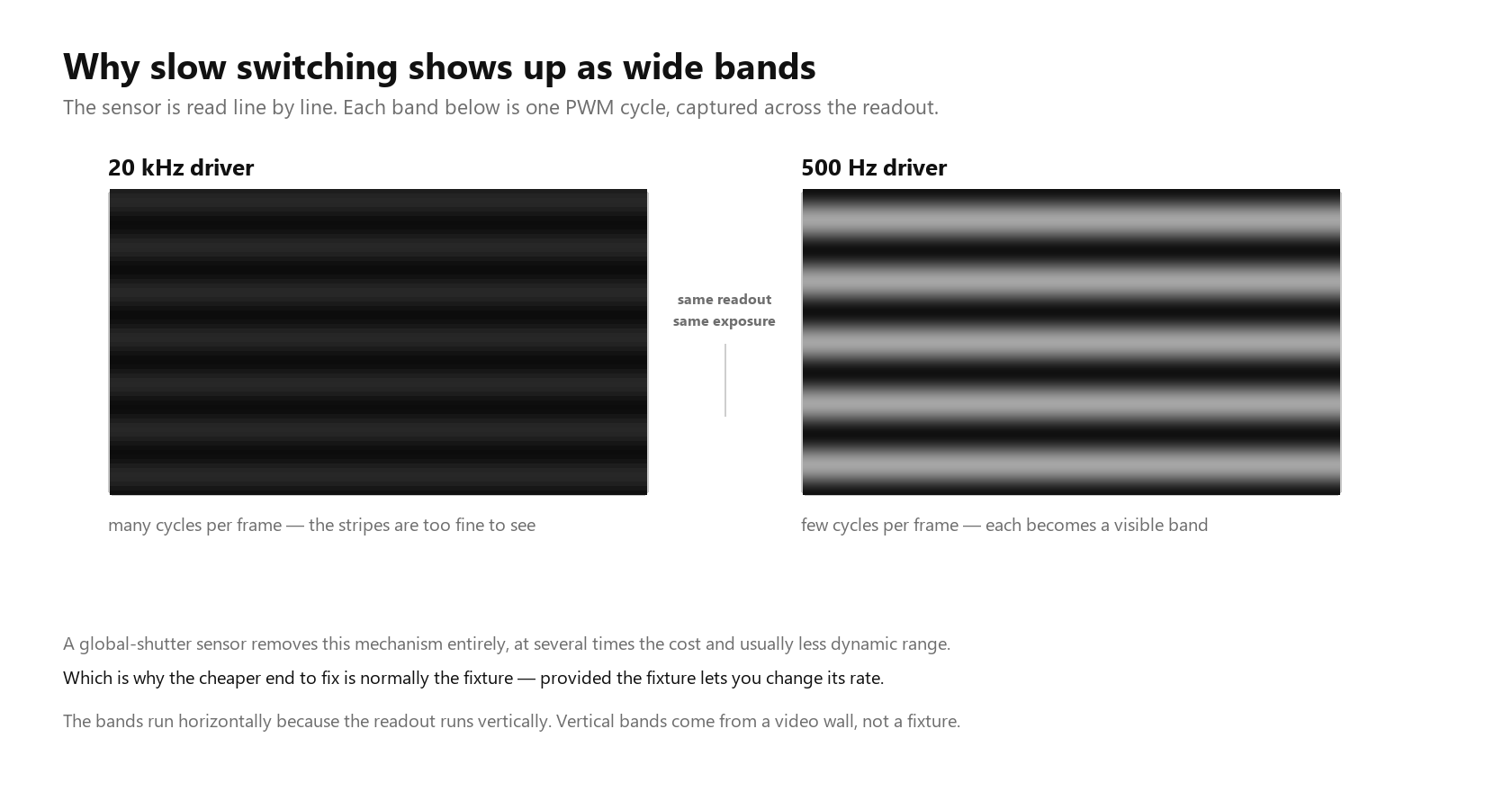
A global-shutter camera removes this mechanism. It also costs several times as much, gives up dynamic range, and is rarely the camera a venue already owns. Which is why, in practice, the fixture is usually the cheaper end to fix — if the fixture lets you change the rate.
5. The Frequency Tiers: What 500 Hz to 25 kHz Buys
PWM rates cluster into bands, and the bands correspond roughly to what the fixture is expected to do.
| Tier | PWM range | What it handles | Where it fails |
|---|---|---|---|
| Entry | 500–1,200 Hz | No cameras. Fine to the eye at any level | Fails on almost any video, especially at low dim levels |
| Mid professional | 1,500–5,000 Hz | Event photography, 24–30 fps, moderate shutter | High frame rates, slow motion, and deep dimming |
| Camera-safe | 10,000–25,000 Hz | Broadcast, livestream, 50–60 fps, most venue work | High-speed slow motion at 240 fps and above |
| Broadcast / high-speed | Above 40 kHz, or linear dimming | Slow-motion capture, studio work at high frame rates | Cost, and diminishing returns below that point |
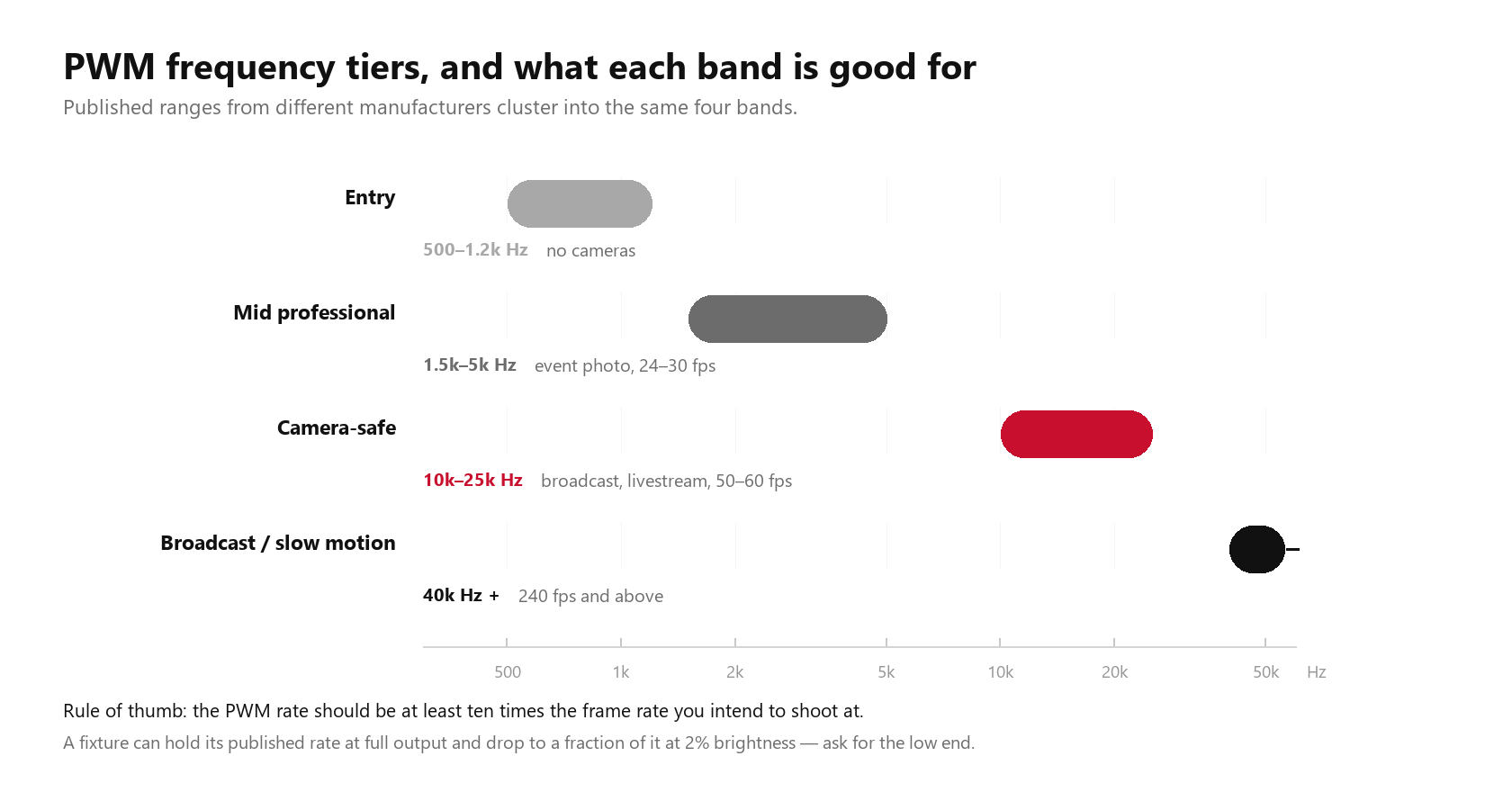
The numbers are quoted differently by every manufacturer, but the tiers are consistent across the published ranges of several brands, and the rule of thumb that falls out of them is simple: the PWM rate should be at least ten times the frame rate you intend to shoot at, and comfortably more if the camera will use a fast shutter.
That is a starting point, not a guarantee. Three things can spoil a high number:
- The rate is only quoted at full output. A fixture may hold 20 kHz at 100% and fall back to 2 kHz at 5%. See the next section.
- The driver is not the only switch in the chain. Some fixtures use a hybrid scheme: high-frequency PWM at high levels, constant-current reduction at low levels. Done well this is better than PWM alone; done badly it puts a discontinuity in the middle of a fade, visible as a jump in colour or a sudden stripe at one level.
- Multiple fixtures drift apart. Two fixtures at nominal 5 kHz are not necessarily at the same 5 kHz. When their phases disagree, a camera can show two sets of bands moving against each other, which is much harder to read than one.
6. The Dimming Depth Trap
This is the part of the subject that gets skipped most often, and it is where a fixture that passes a demo fails a show.
Brightness is duty cycle. At 50% the switch is closed half the time. At 5% it is closed for a twentieth of the cycle, and at 1% for a hundredth. The pulse does not get taller or shorter — the period stays the same — but the fraction of each period that is "on" becomes very small.
A camera sampling that period has a fixed window. At high duty cycles a small timing error changes the sampled brightness by a small amount. At 1% duty cycle, the same timing error can change it by most of what little light there is. The same fixture, at the same PWM frequency, can be clean at 80% and visibly unstable at 3%.
Which produces a specific and very common failure: a fixture that is flicker-free on the spec sheet, flicker-free in the showroom, and stripy on the one cue where the LD took it down to 4% for a blackout transition.
There are three ways manufacturers handle the problem, and it is worth knowing which one you are buying:
- Hold the rate, accept the artifact. The cheapest approach. The rate stays high and the low end is simply not camera-safe.
- Raise the rate as the level drops. Some drivers do the opposite of what you would expect and push frequency higher at low duty cycles to compensate. Effective, and requires a well-designed driver.
- Switch to constant-current reduction at the bottom. Instead of switching faster, stop switching: reduce the current itself over the last part of the fade. Smooth, flicker-free, and slightly wider colour shift at the very bottom.
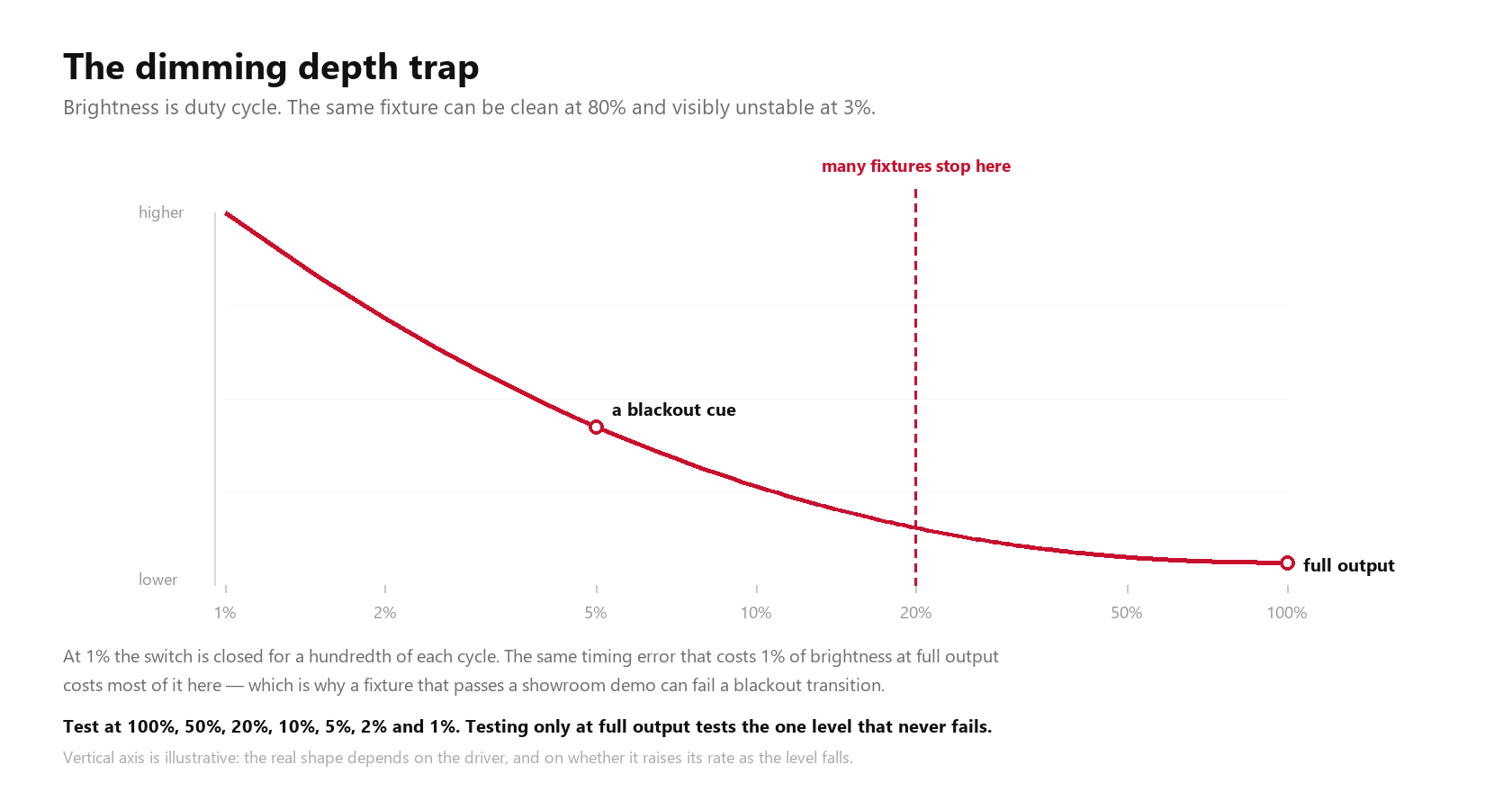
You cannot tell which of the three you have from a spec sheet, because almost no fixture publishes it. You can tell in about thirty seconds with a camera and a fader.
7. What the Camera Can Do, Before You Replace Anything
Before the fixtures get the blame, three camera-side settings are worth trying. None of them costs anything.
Lock the shutter. Auto exposure is the single most common cause of "it flickers sometimes and not other times". Auto will pick a different exposure each frame as the scene changes, and the sampling error moves with it. Lock to 1/50 s or 1/100 s in a 50 Hz country, 1/60 s or 1/120 s in a 60 Hz country, and see whether the artifact changes character.
Use the camera's own flicker reduction, and know what it does. On most consumer and prosumer bodies this preset simply locks the shutter to a mains-compatible value. It is aimed at 100/120 Hz sources and will not fix a 600 Hz fixture. It is not useless — it eliminates one of the two problems, which narrows the other.
Change the frame rate once, deliberately. If the artifact changes when you go from 30 fps to 25 fps, you have confirmed a beat between the frame rate and the PWM rate, and you have also confirmed the fixture is the end that needs to move. If it does not change at all, suspect the mains side or a video wall.
What does not work, in practice: de-flicker plugins. They can rescue a faint whole-frame pulse. They cannot rescue hard stripes, because the information in those rows was never sampled — there is nothing to reconstruct.
8. Ten Minutes of Testing You Can Do Today
You do not need a lab to settle this. You need a phone, a white surface, and the discipline to test the whole dimming range instead of the top of it.
The test:
- Point a fixture at a white wall, white cyc or white card. A coloured surface hides the artifact.
- Film it with a phone in slow motion — 120 fps if that is all you have, 240 fps if available.
- Take the fixture through its range, holding each step for three seconds: 100%, 50%, 25%, 10%, 5%, 2%, 1%.
- Watch the slow-motion playback, and watch where the stripes appear and disappear.
Reading the result:
| What you see | What it means | What to change |
|---|---|---|
| Faint whole-frame pulse, steady rate | Mains ripple or a driver with poor smoothing | Lock shutter to 1/50 or 1/100 |
| Fine stripes that appear below a certain level | Duty-cycle limitation — the classic trap | Raise the fixture's PWM rate, or avoid that dim range on camera |
| Stripes that drift slowly | Small beat between PWM and frame rate | Change either the PWM rate or the frame rate |
| Stripes that appear only on some fixtures | Mixed batches, mixed models, or unsynchronised phases | Match models, or set all rates to the same value |
| No stripes on a phone, stripes on the real camera | The real camera's readout is slower than the phone's | Test with the production camera before the shoot |
The last row is the reason to do this with the camera that will actually be used. A phone at 240 fps is a rough screener; a rolling-shutter mirrorless at 25 fps with a 1/50 s shutter is the thing that will decide whether the stream is usable. If a flicker meter is available — a UPRtek or a Sekonic with PWM mode — it will give a percent-flicker figure at each level, which turns the whole question into a number instead of an opinion. Most venues do not have one, and most of them do not need one: the phone test plus one real camera test answers the same question.
9. Three Questions Before Buying
The subject is invisible on a spec sheet for a simple reason: almost no fixture publishes a PWM rate, and even fewer publish how it behaves across the dimming range. So the questions have to be asked.
1. What is the PWM frequency, in hertz?
Not "flicker-free". Not "camera safe". A number. A supplier who quotes 20 kHz is telling you something checkable; a supplier who quotes a marketing phrase is telling you the phrase.
2. At what dimming depth does that frequency still apply?
This is the question that separates a real answer from a copied one. "20 kHz at full output" and "20 kHz from 100% down to 1%" are different products. If the answer is a range, ask for the lower end.
3. Can you send a test video?
Specify the terms: 25 fps, 1/50 s shutter, the fixture at 100%, 10% and 2%. A supplier with a camera and ten minutes will produce it. A supplier who cannot probably has not tested its own product at the low end, which is exactly where venues get caught.
A fourth question is worth adding if the project has cameras in the brief: is the rate user-adjustable, and over what range? Fixtures that let the rate be set from the menu, or over RDM, can be tuned on site to whatever the production camera turns out to be — see our RDM guide for how far that control reaches. Fixtures with a fixed rate are fine, provided the rate was chosen for cameras in the first place.
10. 16-Bit Dimming, Curve Shape, and the Other Half of the Problem
Frequency is the headline number, but two more things decide whether a fade looks clean on camera.
Resolution. DMX carries 8 bits per channel as standard, which is 256 steps. On a fixture with a long fade from full to black, 256 steps over three seconds is a visible staircase, and each step is a small jump in brightness that a camera can catch. 16-bit dimming — 65,536 steps, carried over a channel pair — removes the staircase. It does not remove PWM stripes, but it removes the second artifact people usually blame on PWM.
Curve. A dimming curve maps DMX value to light output. Linear, square-law and S-curve are common, and they put the same DMX value at very different duty cycles. A fixture on a square-law curve sits at low duty cycle for most of the fader travel, which means it spends most of its fade in the region where camera artifacts are worst. Two fixtures with identical PWM rates can behave completely differently on camera because of this alone.
Phase. In a rig, fixtures are not synchronised by default. Each runs its own clock. When two fixtures with slightly different rates are in the same shot, the camera sees two interference patterns moving against each other, which is far more distracting than one. Some control systems and some fixtures offer synchronisation; where they do not, matching models and firmware is the practical answer.
Put together, the honest summary is this: a PWM frequency figure tells you what the driver is capable of, and almost nothing tells you what the fixture will do at 2% brightness in front of a specific camera. That last part has to be tested, on site, with the camera that will be used. It takes an afternoon, and it is the difference between finding out in rehearsal and finding out on the stream.
Frequently Asked Questions
Why does my LED light flicker on camera but look perfectly steady in the room?
Because the eye and the camera sample light differently. The eye integrates over roughly a tenth of a second, so anything above about 100 Hz reads as steady. A camera exposes for a fixed window per frame — 20 ms at 25 fps with a 180° shutter — and if that window does not contain a whole number of PWM cycles, consecutive frames catch different amounts of on-time. The result is a slow brightness beat or horizontal stripes that exist only in the recording.
Is mains flicker the same as PWM flicker?
No, and the fixes are opposite. Mains flicker comes from the AC supply — 100 Hz on a 50 Hz grid, 120 Hz on a 60 Hz grid — and is cured by locking the camera shutter to 1/50 or 1/100 s. PWM flicker comes from the fixture's own driver switching at anywhere from 500 Hz to 25 kHz, is unrelated to the grid, and is cured by changing the fixture's rate. A shutter preset aimed at mains flicker does nothing for a 600 Hz fixture.
Can flicker be fixed in post-production?
Faint whole-frame pulsing can be reduced by a de-flicker plugin, at some cost in contrast. Horizontal stripes cannot, because the information in those rows was never captured — the plugin has nothing to reconstruct. If the stripes are hard enough to see in the edit, they were hard enough to see on the stream.
Does a higher PWM frequency always mean a better fixture?
No. A high rate quoted at full output tells you little about 2% brightness, which is where venues actually get caught. Rate, dimming depth, driver topology and whether the fixture keeps its rate across the fade all matter, and only the first is usually published. A 25 kHz fixture that falls back at low levels can be worse on camera than a well-designed 10 kHz one that holds its rate all the way down.
Do flicker-free fixtures cost more?
Usually, though less than the difference in specification suggests. The cost is mostly in the driver — a faster switching design, better smoothing, and the firmware to manage rate versus dimming depth. Where the money really goes is the failure it prevents: a re-shoot, a lost stream, or a rig that has to be replaced because it cannot appear on camera at all.
Specifying fixtures for a room with cameras in it? Tell us the frame rate, the shutter and the dim levels the show actually uses, and we will tell you what the fixture has to do at the bottom of the fade — not just at full output.